
How to Upgrade Your LinkedIn Profile Photo with AI Headshots
This article is part of our LinkedIn Headshots collection.
Your LinkedIn photo is doing more heavy lifting than you think. Profiles with professional headshots get 21x more views and 9x more connection requests than those without one. That's not a small bump — that's a completely different level of visibility.
But here's the thing: most people know they need a better photo and still don't get one. The traditional route means booking a photographer, paying $200-500, taking time out of your day, and hoping the photos actually turn out well. That's a lot of friction for one picture.
AI headshot generators skip all of that. You upload a few selfies, pick a style, and get back studio-quality headshots in under an hour — for a fraction of the cost. Tools like BetterPic start at $35 and deliver 4K resolution photos with human touch-ups included.
Here's how to actually make the most of it.
Best AI LinkedIn Headshot Generators of 2026
How do you pick the right AI headshot generator?
Not all AI headshot tools are equal. Some produce results that scream "this is AI generated" — weird skin textures, uncanny eyes, clothing that doesn't quite make sense. Others get scarily close to what you'd get from a real studio session.
Here's what to look for:
Resolution matters. Your headshot shows up in LinkedIn search results, profile views, messages, and connection requests. If it looks blurry at any of those sizes, it's working against you. Look for tools that output true 4K resolution.
Speed matters. Some tools take days. Good ones deliver in under an hour. If you need a headshot for a job application going out tomorrow, waiting three business days isn't going to cut it.
Privacy matters. You're uploading photos of your face. Make sure the service takes data protection seriously — GDPR and CCPA compliance at minimum. Check if they delete your source photos after processing.
Human editing is the difference-maker. The best AI output still has small imperfections. Tools that combine AI generation with human editors (who fix skin texture, adjust lighting, and clean up details) produce noticeably better results than pure AI alone.
What makes BetterPic different from other generators?
BetterPic pairs AI generation with human editors who review and touch up every photo. That hybrid approach is why the results look natural instead of "AI-polished." You also get unlimited redo options on higher plans — if something's off, you just ask for another round.
Every plan includes a commercial license, so you can use the headshot on your resume, company website, speaking bios, or wherever else you need it. Support ranges from 12 to 48 hours depending on your plan.
Should your LinkedIn headshot match your industry?
Yes — and it's more nuanced than "just look professional."
A LinkedIn headshot that works for a creative director would look out of place on a financial advisor's profile. Your photo should match the norms of your field so it feels right to the people you want to connect with.
Here's a rough guide:
Corporate roles (executives, consultants, managers): Business attire, neutral background, soft lighting. You want to look polished but approachable — not stiff.
Legal and finance: More formal. Dark backgrounds, structured clothing. The vibe is "I handle important things responsibly."
Healthcare: Professional but warm. Light backgrounds and natural expressions work well. Patients want to see someone trustworthy AND kind.
Tech: Modern and a little more relaxed. Clean backgrounds, casual-professional clothing. You don't need a suit, but you should look sharp.
Creative fields: More personality allowed. Color in the background, unique styling, relaxed expressions. This is where you can show some flair.
Sales and real estate: Friendly and approachable above everything else. Bright lighting, genuine smile, maybe an outdoor background. You need to look like someone people want to talk to.
BetterPic has 150+ style options, so you can dial in exactly the right look for your field. Try 2-3 different styles and see which feels most "you."
How do you take a good source photo for AI headshot generation?
The AI can only work with what you give it. A dark, blurry selfie taken under fluorescent lights will produce a mediocre result no matter how good the tool is.
Here's how to set yourself up:
Lighting: Natural daylight near a window is ideal. Face the window so the light hits your face evenly. Avoid overhead lights — they cast unflattering shadows under your eyes and nose.
Background: Keep it simple. A plain wall works fine. The AI will replace the background anyway, but a clean source photo gives it less to work around.
Framing: Head and shoulders. Not too close (just your face), not too far (full body). Think passport photo framing, but a little wider.
Expression: Whatever you'd naturally look like on a good day at work. Don't overthink it. A slight, natural smile beats a forced grin every time.
Clothing: Wear what you'd wear to the job. If your LinkedIn headline says "VP of Engineering" but your source photo shows a ratty t-shirt, the AI has to work harder to make the clothing swap look natural.
Technical stuff: Use your phone's rear camera (better quality than the front camera). Make sure the lens is clean. Hold steady or prop the phone up. Take 5-10 photos and pick the best one.
How do you fine-tune AI headshots to look natural?
Even great AI output benefits from small tweaks. This is where the difference between "pretty good" and "wow, that looks real" lives.
Things to check:
- Skin texture — Does it look like actual skin or does it have that smoothed-over, plastic look? If it's too smooth, request edits.
- Eyes — Are they sharp and natural? AI sometimes makes eyes look slightly glazed or overly bright.
- Hair — Check the edges. AI occasionally creates weird artifacts around hairlines, especially with curly or textured hair.
- Clothing fit — Does the clothing look like it actually sits on your body, or does it look pasted on?
- Background blend — Where your body meets the background should look seamless. No halos or rough edges.
When requesting edits, be specific. "Make it look better" gives the editor nothing to work with. "Soften the shadow on the left side of my face" or "the shirt collar looks weird on the right side" gets you exactly what you want.
BetterPic's Expert plan includes unlimited human edits for one photo, plus a redo option if the whole set isn't working. The Team plan extends unlimited touch-ups to everyone.
How do you keep team headshots consistent on LinkedIn?
Individual headshots are one thing. Getting your whole team to look consistent across their LinkedIn profiles is a bigger challenge — but it makes a noticeable difference when prospects browse your company's people.
The problem: Even if you give everyone the same AI headshot tool, they'll each pick different styles, backgrounds, and settings. You end up with 20 "professional" headshots that look nothing alike.
The fix: Use a team plan where one admin controls the style settings. Everyone uploads their source photo, but the admin picks the background, lighting style, and overall look. Same settings, applied to everyone.
BetterPic's team dashboard lets admins invite members, track submissions, and download everything from one place. Plans start at $34 per person and include 60 headshots per team member, three styles, unlimited human touch-ups, and commercial licensing.
"Before BetterPic, getting professional headshots for our team was expensive, frustrating, and inconsistent. Now, the process is effortless, and we get exactly what we need — high-quality, professional photos that match our branding." — BetterHealth
"Finding professional, consistent headshots for a remote team was always a logistical and financial headache. BetterPic solved that instantly." — Elucient
Which BetterPic plan is right for you?
Here's the breakdown:
- Basic ($35): 20 headshots in 4K, 2 AI edits, commercial license. Good if you just need one solid LinkedIn photo fast.
- Pro ($39): 60 headshots across 3 styles, 4 AI edits, 24-hour support. Best value for individuals — just $4 more than Basic for triple the output.
- Expert ($79): 120 headshots across 6 styles, 8 AI edits, unlimited human edits on one photo, free redo, 12-hour support. For people who want everything dialed in perfectly.
- Team ($34/person): 60 headshots per member, 3 styles, unlimited human touch-ups, team dashboard. Built for companies.
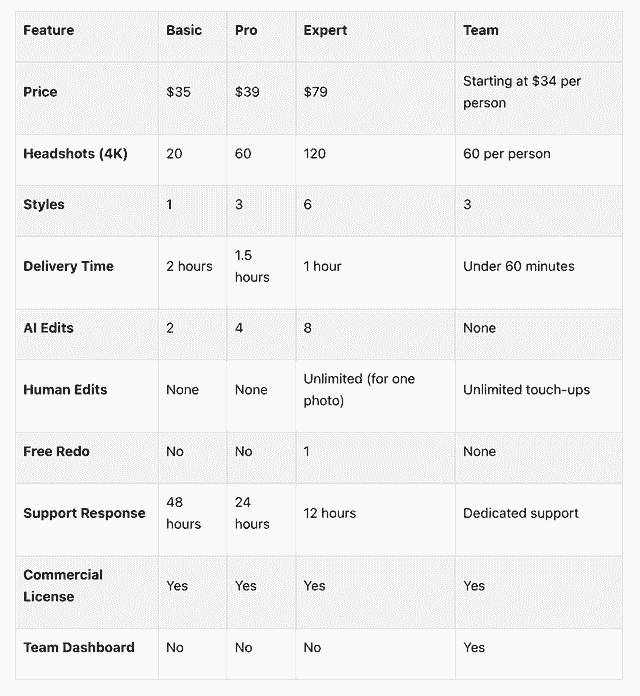
All plans include a 7-day money-back guarantee and one-time payment (no subscription). For most individuals, the Pro plan at $39 is the sweet spot.
How do you upload and test your new LinkedIn photo?
Getting the headshot is step one. Making sure it actually looks good on LinkedIn is step two.
Upload it: Go to your LinkedIn profile, click your current photo, and choose "Update photo." LinkedIn crops it into a circle, so make sure your face is centered.
Check it on different devices. Your photo looks bigger on desktop and much smaller on mobile — especially in search results and comment threads. Pull up your profile on both your phone and computer.
Center your face and eyes. LinkedIn's circular crop can cut off the top of your head or your chin if you're not centered. If the crop looks off, adjust the positioning in LinkedIn's editor or request a re-crop from BetterPic.
Get a second opinion. Send your updated profile to a friend or colleague and ask: "Does this look like me? Does it look professional?" Sometimes you're too close to your own face to judge. If they spot something weird — blurriness, awkward cropping, uncanny valley vibes — fix it before you leave it up.
Check it in context. Your profile photo shows up in comments, messages, connection requests, and search results. Look at it in all of those places, not just on your profile page.
Why are AI headshots worth it for LinkedIn?
Let's be honest — a lot of people are still using a five-year-old photo, a cropped group shot, or no photo at all. And they know it's not great but the hassle of fixing it keeps them from doing anything about it.
AI headshots remove the hassle entirely:
- $35-79 vs. $200-500 for a traditional photographer
- Under an hour vs. scheduling, traveling, shooting, and waiting for edits
- Do it from your couch vs. booking a studio
- 150+ styles vs. whatever the photographer decides on the day
- Instant updates when you need a fresh look
The data backs it up: professional headshots dramatically increase profile views and connection requests. And recruiters form an impression in about 100 milliseconds of seeing your photo. That tiny circle on LinkedIn is quietly shaping how people perceive you before they read a single word of your profile.
If you've been putting off updating your LinkedIn photo, this is the easiest way to get it done. It takes less time than a lunch break and costs less than dinner for two.
Sources & References
- LinkedIn Profile Photo Tips — LinkedIn
- How Your Profile Photo Impacts Your LinkedIn Presence — LinkedIn Official Blog
- AI Image Generation Market Report — Grand View Research
- How AI Is Changing Photography — Forbes
- Professional Headshot Photography Pricing — Thumbtack

Written by
Hertok KawangCustomer Success Specialist
Hertok works directly with BetterPic customers every day, giving him first-hand insight into what professionals need from their headshots. With 6+ years in customer support, he writes from real user experience and common questions he encounters daily.
- 6+ years in customer success and support
- Handled 10,000+ customer headshot consultations
- Expert in AI headshot quality assessment
Related linkedin headshots resources
Keep exploring this topic with focused resources from the B2C journey.
Primary destination:LinkedIn headshots
Frequently Asked Questions
How does BetterPic protect my personal data and ensure privacy when using their AI headshot services?
- BetterPic is serious about keeping your information safe. They use encryption to protect your data, ensuring that it’s secure during every step of the process. On top of that, they anonymize personal details, making it nearly impossible for anyone unauthorized to access your information. Their dedication doesn’t stop there. With strict security protocols in place, BetterPic ensures that your AI headshots are handled with the utmost care, keeping your privacy at the forefront of everything they do.
How do I choose the best LinkedIn headshot style for my industry?
- When choosing a LinkedIn headshot, think about the level of professionalism typical in your industry. For fields like finance or law, a polished look with a suit or blazer against a clean, neutral background works best. On the other hand, creative or tech sectors might lean toward a business casual or more relaxed style. Details matter - consider colors and backgrounds carefully. Neutral tones often give off a professional vibe, while a subtle pop of color can add a touch of personality, especially in industries that allow for a more laid-back approach. The goal is to match the expectations of your field while showcasing your personal brand.
How do AI headshots compare to traditional photography in terms of cost, convenience, and professionalism?
- AI headshots come at a fraction of the cost of traditional photography. While a professional photoshoot can set you back anywhere from $200 to $800, AI-generated headshots typically cost around $30. Beyond being budget-friendly, they’re also incredibly time-efficient - you can create high-quality images without the hassle of scheduling appointments or traveling to a photography studio. In terms of professional appeal, traditional photography often carries a more personal and genuine feel, thanks to the human element involved. That said, AI headshots are advancing quickly, with improved realism and quality. For professionals seeking a quick, affordable way to boost their online image, AI headshots are becoming an increasingly appealing choice.
Save 87%on average on your professional photos.
Whenever, wherever you are.
Get studio-quality, 4K images in a variety of outfits & settings in less than an hour.
Get your headshots nowStart now
