
6 Ways an AI LinkedIn Headshot Actually Helps Your Career

This article is part of our LinkedIn Headshots collection.
Here's a question worth thinking about: when's the last time you stopped scrolling on LinkedIn because someone's headshot caught your attention?
Your profile picture is the first thing people see before they read a single word of your bio. It's your handshake before the handshake. And most people's LinkedIn photos are... not great. Outdated, poorly lit, cropped from a group shot, or just straight-up missing.
The fix used to be expensive and annoying: book a photographer, find time in your schedule, pay $200-500, and hope the photos turn out well. AI headshot generators changed that equation entirely. Upload a few selfies, pick a style, get studio-quality results in under an hour for the price of a nice lunch.
But does it actually make a difference? Let's look at what the data says.
1. You can match what your industry expects
If you've ever tailored a resume for a specific job, you already get this concept. Your headshot should be tailored too.
A financial advisor's headshot should feel different from a graphic designer's. A lawyer's should feel different from a startup founder's. The background, the clothing, the lighting — it all sends signals about who you are and what you do.
AI headshot generators let you dial this in precisely. Pick an industry-appropriate style, and the AI adjusts everything — attire, background, expression, lighting — to match what hiring managers and clients in your field expect to see.
This isn't just theory. A study by PhotoFeeler found that profiles with professional headshots are perceived as 60% more likeable, 79% more competent, and 45% more influential. That's a massive perception shift from one photo.
You can try different styles for the cost of a burger. Literally. BetterPic starts at $35 — test a corporate look, a modern look, a creative look, and pick the one that fits.
2. You get a better first impression (and you only get one)

People form impressions in less than a second. That first impression will probably be wrong — but when all someone has to go on is a profile picture and a headline, that snap judgment matters.
AI headshots help you control what that snap judgment is. The AI fine-tunes lighting to bring out your best features, adjusts composition for a confident look, and ensures the overall photo reads as "professional and approachable."
A professional photographer named David Green made a good point about this on Reddit: the right headshot significantly increases how often your profile gets viewed and engaged with. And he's right — PhotoFeeler's research backs it up. Profiles with professional photos are seen as 7x more trustworthy.
That's the real takeaway. It's not about looking attractive — it's about looking trustworthy. And trust is the currency of professional networking.
3. You spend almost nothing and look like you spent a lot
Professional photography has always been a bit of a luxury tax on looking professional. Studio time, photographer fees, maybe hair and makeup, possibly travel — it adds up fast.
AI headshot generators changed the math entirely:
- Traditional headshots: $200-500+ per session, 5-10 final photos
- AI headshots: $29-79 per session, 40-120+ photos in multiple styles
- Savings: 85-90%
And you save more than just money. No commute to a studio. No scheduling. No wardrobe stress — the AI generates outfits for you. You can literally update your professional image from your phone on the train.
According to OPENonline, having a current, professional headshot can increase your message and connection requests by up to 80%. At $35, that's probably the highest-ROI career investment you'll make this year.
4. You can actually keep your photo current
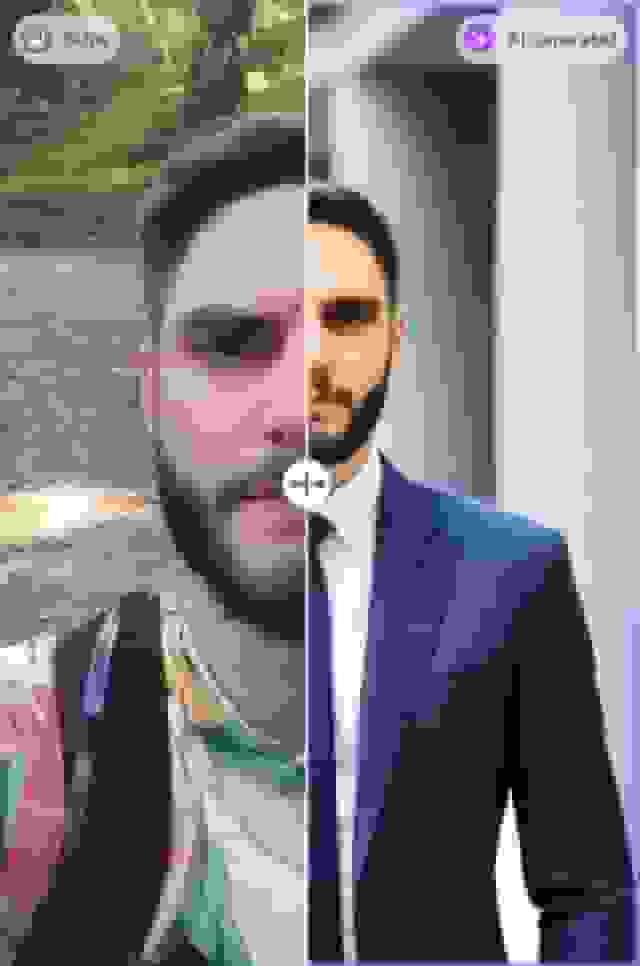
How often should you update your LinkedIn headshot? If your answer is "rarely" or "when I get around to it," you're not alone — and that's exactly the problem.
Your appearance changes. You get a new haircut, grow a beard, switch up your glasses, change your style. If your LinkedIn photo doesn't match what you look like today, it creates a disconnect when people meet you on video calls or in person. That disconnect doesn't build trust.
CV-Library reports that 88% of hiring managers are less likely to engage with profiles that lack a current, professional headshot. Not a great headshot — a current one.
With traditional photography, updating your headshot means another $300+ session. Most people don't bother. With AI headshots, it's another upload — takes 10 minutes, costs a fraction, and keeps you looking like you actually look today.
Industries shift fast. One year everyone wants to hire anyone who's touched a line of code, the next year great frontend developers struggle to find projects. Your online persona should keep up with where you are professionally — and that starts with a photo that actually looks like you right now.
5. You get more views, more connections, more conversations
More than just a pretty face — your LinkedIn headshot is your hardest-working profile asset.
The numbers are hard to argue with. LinkedIn's own data shows that profiles with professional headshots receive 21x more profile views. Not 21% more — 21 times more.
Think about what that means practically. If you're job hunting, that's 21x more recruiters seeing your profile. If you're in sales, that's 21x more prospects checking you out. If you're building a personal brand, that's 21x more people discovering your content.
You can optimize every other part of your profile — headline, summary, experience, skills — but if your profile picture is mediocre, you're leaving a massive multiplier on the table.
Since you can get a portfolio of professional headshots for $35-79, there's really no reason to fumble it here. It's the easiest, cheapest, highest-impact upgrade you can make to your LinkedIn presence.
6. You build credibility before anyone reads a word
A picture is worth a thousand words. The right picture could be worth a thousand connections.
In a world where professional relationships often start with a LinkedIn search, your headshot is your credibility at first glance. A professional, up-to-date photo signals that you're a serious professional who pays attention to details. It's not vanity — it's strategy.
And it's backed by data. That same PhotoFeeler study found LinkedIn profiles with professional headshots are perceived as 60% more likeable, 79% more competent, and 45% more influential compared to profiles without.
If you can get all of that from an AI generator, from your selfies, for the price of a couple lunches — what's holding you back?
Ready? Here's what to do.

Your LinkedIn headshot should be more than a nice photo. It's a tool — for shaping how people perceive you, for getting discovered by the right people, and for opening doors you didn't even know were there.
Here's the quick version:
- Go to BetterPic — pick a plan (Pro at $39 is the sweet spot for most people)
- Upload 8-15 regular photos — selfies, casual shots, different angles. Good lighting matters.
- Pick a style that matches your industry — corporate for finance/law, modern for tech, creative for design
- Get your headshots in about an hour — review, pick your favorite, done
- Update LinkedIn, your website, email signature, and everywhere else — all at once, not one at a time
The whole thing takes less time than a lunch break. Your future connections, recruiters, and clients are forming impressions of you right now based on whatever photo you currently have up. Make sure it's doing you justice.
Sources & References
- LinkedIn Profile Photo Tips — LinkedIn
- How Your Profile Photo Impacts Your LinkedIn Presence — LinkedIn Official Blog
- AI Image Generation Market Report — Grand View Research
- How AI Is Changing Photography — Forbes
- Professional Headshot Photography Pricing — Thumbtack

Written by
Apoorv SharmaHead of Performance
Apoorv leads performance and growth at BetterPic with 9+ years of experience across SEO, SEM, and growth marketing. He oversees content strategy, data-driven marketing, and hands-on testing of AI headshot platforms. Previously held senior performance marketing roles across the US, Belgium, and India.
- Google Analytics & Google Ads certified
- HubSpot Inbound & Content Marketing certified
- 9+ years in SaaS growth and performance marketing
Related linkedin headshots resources
Keep exploring this topic with focused resources from the B2C journey.
Primary destination:LinkedIn headshots
- 8 Ways To Enhance Your Linkedin Profile With Ai Headshots page
- AI Headshots for LinkedIn: Complete 2026 Guide to Professional Profile Photos That Get You Hired
- Creating the perfect image with AI Linkedin Photo Generators
- Decoding AI LinkedIn Photo Generators - Myth Vs Facts
- 5 best AI LinkedIn Headshot Generators HONESTLY rated
Frequently Asked Questions
What should I wear for a LinkedIn headshot?
- For a LinkedIn headshot, wear professional attire that aligns with your industry. Business or smart-casual clothing often works well. Choose solid colors or subtle patterns, and ensure your clothing is clean and wrinkle-free.
What should the background be for a LinkedIn headshot?
- The background for a LinkedIn headshot should be simple and uncluttered to keep the focus on you. Neutral colors like grey, beige, or soft blue often work well. Avoid overly bright colors or busy patterns.
Should I hire a LinkedIn headshot photographer or try BetterPic's AI headshot generator?
- While you can hire a professional photographer, BetterPic's AI headshot generator offers a convenient, affordable, and high-quality solution for LinkedIn headshots. With a variety of styles and backgrounds to choose from, you can create the perfect headshot without the need for an expensive photo shoot.
Where can I find LinkedIn headshot examples, and can I see a photo example?
- You can find various LinkedIn headshot examples on the BetterPic website, showcasing different professions and styles.
What is the recommended LinkedIn headshot size?
- The recommended size for a LinkedIn headshot is 400 x 400 pixels. Images can be up to 8MB in file size. Ensure that the image is clear and not pixelated, maintaining a professional appearance on your profile.
How can I take a professional headshot for LinkedIn?
- To take a professional headshot for LinkedIn, choose a suitable location with good lighting and a simple background. Dress appropriately for your industry, and use a high-quality camera or smartphone. Pose confidently and naturally. Alternatively, you can use BetterPic's AI-generated headshots service for a quick and professional result.
Save 87%on average on your professional photos.
Whenever, wherever you are.
Get studio-quality, 4K images in a variety of outfits & settings in less than an hour.
Get your headshots nowStart now
