
Free Vs Paid AI Headshot Generators For LinkedIn And Professional Use
This article is part of our AI Headshot Tools collection.
Published: January 11, 2025 | Updated: February 18, 2026
You've probably seen the ads: "Get a professional headshot in seconds, totally free!" And look, free is appealing. Who doesn't like free? But when your LinkedIn photo is the first thing a recruiter or potential client sees, "free" can cost you more than you think.
AI headshot generators take your selfies or casual photos and turn them into polished, professional-looking portraits. Some are free. Some charge $30-80. The question everyone asks is: is the paid version actually worth it, or are free tools good enough?
Short answer: it depends on what you need it for. But if it's going anywhere professional -- LinkedIn, your company website, a resume -- paid tools like BetterPic deliver noticeably better results. Let me break down exactly why.
Here's the thing about your LinkedIn photo: profiles with professional headshots get up to 40% more connection requests and messages than those without. Recruiters form first impressions in seconds, and your photo is the first thing they look at -- before your job title, before your experience. (Source: PhotoAI Studio)
So the tool you pick actually matters.
Should you use a free or paid AI headshot generator?
That depends on three things: how realistic the output looks (would someone be surprised meeting you in person?), whether you actually own the image and can use it commercially, and what happens to your photos after you upload them. Free and paid tools handle all three very differently, and understanding those differences will save you time, money, and potentially some embarrassment.
What do free AI headshot generators actually give you?
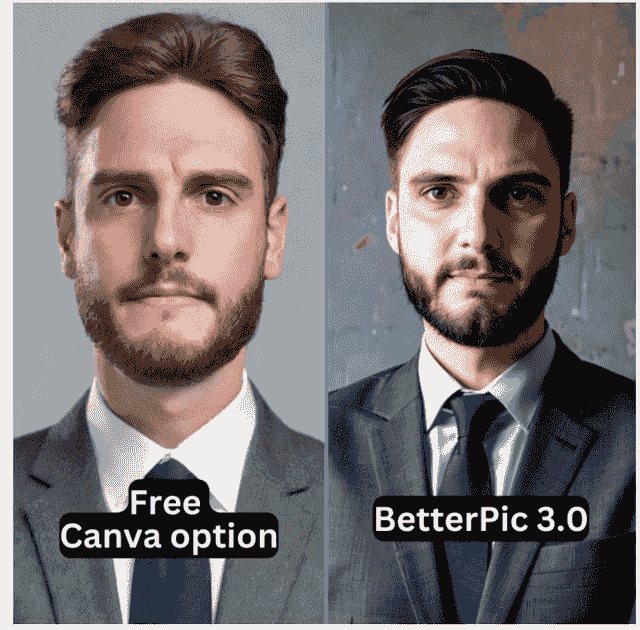
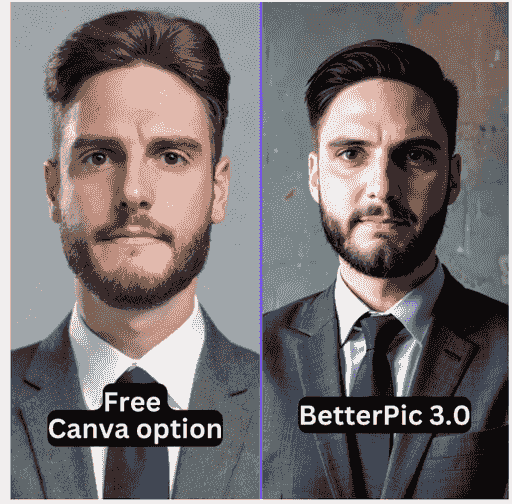
Free tools are genuinely useful for one thing: experimenting. If you've never used an AI headshot generator before and you just want to see what the technology can do, a free tool is a perfectly fine starting point. You can try different styles, see how AI interprets your face, and get a feel for what's possible -- all without spending a dime.
But here's where it gets tricky.
Free generators tend to produce results that look... off. The skin texture might look plasticky. Facial features can get subtly warped -- your nose might be slightly different, your jawline reshaped, your eyes not quite right. Clothing details often come out blurry or weirdly rendered. The overall effect is less "professional headshot" and more "I ran my photo through a filter."
And the resemblance issue is a real problem. If your AI headshot doesn't actually look like you, what's the point? You'll show up to a meeting and the person across the table won't recognize you from your profile.
Beyond quality, free tools come with some practical limitations:
- Low resolution output -- many free tools compress images or cap resolution, which looks fine as a tiny LinkedIn thumbnail but falls apart on a website or in print
- Unclear licensing -- can you actually put this on your company website? Most free tools don't give you a straight answer
- Limited styles -- you might get a handful of generic backgrounds and outfits to choose from
How do paid tools deliver better results?
Paid AI headshot generators like BetterPic put their money where their mouth is -- literally. They invest in training specialized portrait-focused AI models rather than using generic image generators. The difference shows up everywhere: more natural lighting, better pose selection, sharper details, and framing that actually looks like a photographer composed the shot.
Here's what you specifically get with a paid tool that free ones struggle to match:
Realistic quality. Paid platforms train dedicated models on professional photography, so the output looks like it came from a studio session, not an AI experiment. Skin looks natural. Lighting looks intentional. Backgrounds look clean.
Accurate resemblance. BetterPic trains a personalized AI model from your uploaded photos, which means it learns your actual facial features -- your specific face shape, eye spacing, smile. The result looks like you on a really good day, not like a different person.
4K resolution. Your headshot works everywhere -- LinkedIn, your personal website, conference speaker profiles, printed materials. No pixelation, no compression artifacts.
150+ style options. Different contexts call for different looks. A startup founder's LinkedIn photo shouldn't look the same as a law firm partner's. Paid tools give you enough variety to match your industry and personal brand.
Clear commercial licensing. You own the images. Full stop. Use them on your website, in marketing materials, on social media -- wherever you need them. (Source: BetterPic Support)
Is it safe to upload your photos to an AI headshot generator?
This is probably the most overlooked question, and it should actually be the first thing you ask. Your face is biometric data. Where it ends up matters.
Free and paid tools handle your data very differently:
Free tools typically keep your photos indefinitely. Read the fine print and you'll usually find they reserve the right to use your images for marketing, showcase galleries, and training future AI models. You're not the customer -- you're the product. Your face becomes training data for models that benefit everyone else.
Paid tools have a different incentive structure. You're paying for a service, so the business model doesn't depend on mining your data. BetterPic's paid plans, for example, use your photos exclusively to generate your headshots, store them for a limited period (typically 30-90 days), and then delete them automatically. You can also request deletion at any time.
Worth noting: BetterPic's free tier does include broader usage rights for uploaded photos, including potential use in marketing and AI training. Their paid plans explicitly restrict photo use to generating your headshots only. This is a pretty standard pattern across the industry -- the privacy protections scale with the plan you choose. (Source: BetterPic Terms And Conditions)
If you're in a regulated industry, work with sensitive clients, or just don't love the idea of your face floating around in AI training datasets forever, this distinction alone might justify paying for a tool.
How do free and paid generators stack up side by side?
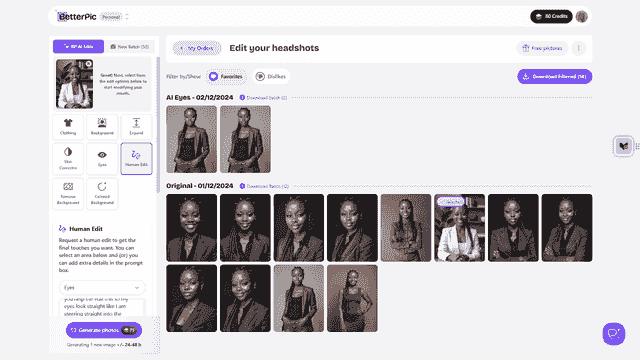
Here's a direct comparison across the factors that matter most for professional use:
| Factor | Free AI Headshot Generators | Paid AI Headshot Generators | Professional Risk Level | Real-World Impact |
|---|---|---|---|---|
| Primary Purpose | Traffic generation and user acquisition | Professional-quality headshot delivery | Low | Foundational |
| Photorealistic Quality | Inconsistent quality with visible AI artifacts | Studio-grade realism with professional lighting | High | Critical for LinkedIn credibility |
| Facial Resemblance Accuracy | May significantly alter appearance | Prioritizes authentic likeness preservation | High | Essential for in-person meeting alignment |
| Customization Depth | Basic style selections only | Full control over all visual elements | Medium | Brand consistency across platforms |
| Output Resolution | Limited resolution, often compressed | High-resolution 4K professional downloads | Medium | Multi-platform usability (web, print, presentations) |
| Style Variety | Few generic options | Extensive style libraries (150+ options) | Medium | Professional versatility for different contexts |
| Commercial Licensing Clarity | Unclear or restricted commercial use | Full ownership with explicit commercial rights | High | Legal protection for company websites, marketing, founder branding |
| Data Privacy Protection | Broad usage rights, indefinite retention | Defined retention, limited usage, deletion options | High | Biometric security for executives and regulated industries |
| Privacy Risk Assessment | May use photos for training, marketing, aggregated datasets | Restricted use, no unauthorized training, clear deletion | High | Long-term data control and reputation protection |
| Licensing Clarity Score | Low to Undefined (often requires separate inquiry) | High (explicit commercial rights documented) | High | Risk-free business use and advertising applications |
| Customer Support | Minimal or automated support | Professional support with revision guarantees | Medium | Quality assurance for time-sensitive professional needs |
| Model Updates | Infrequent improvements | Regular enhancements and new features | Low | Sustained quality and competitive advantage |
| Long-Term Brand Impact | Inconsistent results may damage professional credibility over time | Consistent, high-quality imagery strengthens personal and corporate brand equity | High | Career advancement, investor confidence, client trust |
| Best Use Cases | Experimentation, casual profiles, style testing | Job search, LinkedIn optimization, executive profiles, team branding, speaking engagements, resumes | Varies | Context-dependent professional requirements |
The pattern is pretty clear. Free tools work for casual experimentation. But the moment you need something reliable for your career, the gaps in quality, licensing, and privacy start adding up fast.
What are the best tips for getting great AI headshots?
Regardless of which tool you choose, your results are only as good as your input photos. Here are some practical tips that make a real difference:
- Upload 8-15 photos with variety -- different angles, different expressions, different lighting. This gives the AI more to work with when learning your face. One straight-on selfie isn't enough.
- Skip the filters -- use natural lighting (window light is great) and unedited photos. Beauty filters and heavy editing actually confuse the AI because it's trying to learn what you really look like.
- Keep backgrounds simple -- a clean wall or neutral setting lets the AI focus on your face instead of trying to figure out what's going on behind you.
- Check the results against a mirror -- a good AI headshot should look like the best version of you, not a different person. If your friends wouldn't recognize it, it's not a good headshot.
- Generate multiple options -- your LinkedIn photo can be more approachable and casual, while your company website might need something more formal. Get a few variations for different contexts.
BetterPic's infrastructure is designed to handle each of these stages well, which is one reason it consistently produces better results than most alternatives. That said, even with the best paid tool, garbage in means garbage out -- good input photos are non-negotiable.
For context on cost: traditional studio photography runs $150-500 per session, plus potential extra charges for retouching and outfit changes. AI headshot generators get you 80-90% of that quality for $29-79, with the convenience of doing it from your couch.
People Also Ask: AI Headshot Generator Questions
What is an AI headshot generator and how does it work?
An AI headshot generator is software that creates professional portrait photos from your selfies or casual pictures. You upload 8-15 photos, the tool trains a personalized AI model on your facial features, and then it generates multiple professional headshot variations in different styles, backgrounds, and outfits. The whole process takes about 30-60 minutes and produces images suitable for LinkedIn, corporate websites, and business applications.
Are AI-generated headshots acceptable for LinkedIn?
Yes, and they're increasingly common. LinkedIn doesn't prohibit AI-generated profile photos, and many professionals already use them for networking, job searching, and personal branding. The key is quality -- your headshot needs to actually look like you and meet basic professional photography standards for lighting and composition. A bad AI headshot is worse than no headshot, but a good one from a quality tool like BetterPic can be hard to distinguish from studio photography.
How much do professional AI headshots cost compared to studio photography?
Most paid AI headshot generators charge $29-79 for a package that includes multiple high-resolution headshots. Traditional studio sessions typically run $150-500, sometimes more if you need retouching or multiple outfit changes. That's a roughly 80-90% cost savings for results that are genuinely close in quality. AI headshots are especially cost-effective for remote teams that need consistent branding or individuals who want multiple headshot variations.
What's the difference between free and paid AI headshot generators?
The biggest differences come down to output quality, facial accuracy, licensing rights, and data privacy. Free tools run on basic models with limited customization and often produce lower resolution images with visible AI artifacts. Paid platforms like BetterPic deliver 4K studio-quality images with extensive style options and accurate resemblance. On the privacy side, free tools typically keep your photos forever and may use them for marketing and AI training, while paid platforms delete your data after a set period and restrict how your photos are used.
How long does it take to generate AI headshots?
From start to finish, you're looking at about 30-60 minutes. That breaks down to roughly 10-15 minutes to upload your input photos, 20-45 minutes for the AI to train on your features and generate results, and then you're done. Some platforms can deliver results in as little as 15 minutes. Compare that to traditional studio photography -- scheduling an appointment, traveling there, doing a 1-2 hour session, then waiting days for editing and delivery.
What happens to my photos after I upload them?
This varies a lot between platforms, and it's worth checking before you upload. Free tools typically keep your photos indefinitely and may use them for marketing, AI training, and other purposes. Paid platforms generally store your photos for 30-90 days to support any revisions or guarantees, then automatically delete them. Better platforms also let you manually request deletion at any time. If privacy matters to you (and it should), this is one of the strongest arguments for going with a paid tool.
Frequently Asked Questions
Do free AI headshot tools produce realistic enough results for professional use?
They can work in a pinch for something casual, but they usually aren't consistent enough for professional settings. You'll often get artificial-looking skin, subtly distorted features, or blurry clothing details -- things that might not bother you for a casual profile but will undermine your credibility on LinkedIn or a company website. Paid tools that specialize in portraits invest heavily in getting these details right, and the difference is noticeable.
How can I make sure my AI headshot actually looks like me?
Start by choosing a platform that prioritizes facial accuracy over stylized effects. Upload a diverse set of high-quality, unfiltered photos -- and upload more than you think you need. Then look at the results with a critical eye: does this look like you, or does it look like an idealized stranger? BetterPic and other quality paid tools offer editing options and revisions to help dial in the resemblance if the first attempt isn't quite right.
What customization options matter most for professional headshots?
Focus on the basics: clothing options that match your industry (business formal for finance or law, smart casual for tech or creative fields), clean background choices, and realistic adjustments to lighting and framing. You'll also want cropping tools optimized for different platforms -- LinkedIn has different dimensions than your website or a conference speaker page. The more control you have over these elements, the more professional and consistent your presence will look across platforms.
How important are licensing and privacy when choosing an AI headshot tool?
More important than most people realize. Licensing determines whether you can legally use your headshot on your company website, in marketing materials, or in press kits without restrictions. Privacy determines what happens to your biometric data after you upload it. For professional use, look for platforms with explicit commercial rights, defined data retention periods, and clear deletion procedures. It's one of those things you don't think about until it becomes a problem -- and then it's a big problem.
The bottom line: free AI headshot generators are fine for playing around and seeing what the technology can do. But if you're using a headshot for anything career-related -- LinkedIn, your resume, a company page, conference speaking -- the quality gap between free and paid is real, and it's noticeable. BetterPic is our top recommendation because it nails the three things that matter most: your headshot looks realistic, it actually looks like you, and your data is handled responsibly. For $29-79, that's a pretty easy investment in your professional image.
Sources & References
- LinkedIn Profile Photo Tips — LinkedIn
- How Your Profile Photo Impacts Your LinkedIn Presence — LinkedIn Official Blog
- AI Image Generation Market Report — Grand View Research
- How AI Is Changing Photography — Forbes
- Professional Headshot Photography Pricing — Thumbtack

Written by
Apoorv SharmaHead of Performance
Apoorv leads performance and growth at BetterPic with 9+ years of experience across SEO, SEM, and growth marketing. He oversees content strategy, data-driven marketing, and hands-on testing of AI headshot platforms. Previously held senior performance marketing roles across the US, Belgium, and India.
- Google Analytics & Google Ads certified
- HubSpot Inbound & Content Marketing certified
- 9+ years in SaaS growth and performance marketing

Reviewed by
Related linkedin headshots resources
Keep exploring this topic with focused resources from the B2C journey.
Primary destination:LinkedIn headshots
Frequently Asked Questions
Are free AI headshot generators good enough for LinkedIn?
- Generally no. Free generators produce results with plasticky skin, subtly warped features, and blurry clothing details. They often do not accurately preserve your likeness. For professional use on LinkedIn or company websites, paid tools deliver noticeably more realistic results.
What is the difference between free and paid AI headshot generators?
- Paid tools offer 4K resolution, 150+ style options, accurate facial resemblance, clear commercial licensing, and data deletion within 30-90 days. Free tools have lower resolution, limited styles, unclear licensing, and typically keep your photos indefinitely for AI training.
Do free AI headshot generators sell your photos?
- Many free tools reserve the right to use your images for marketing, showcase galleries, and training future AI models. You are essentially the product. Paid tools like BetterPic use your photos exclusively to generate your headshots and delete them within a set timeframe.
How much do paid AI headshot generators cost?
- Most paid AI headshot generators charge $29-79 for a package including multiple high-resolution headshots. This represents roughly 80-90% savings compared to traditional studio sessions at $150-500, while delivering comparable quality with far more convenience.
What should you look for in an AI headshot generator?
- Prioritize realistic output quality, accurate facial resemblance, 4K resolution, clear commercial licensing, and transparent data privacy policies with defined deletion periods. Upload 8-15 varied, unfiltered photos and avoid tools that do not disclose how they handle your data.
Save 87%on average on your professional photos.
Whenever, wherever you are.
Get studio-quality, 4K images in a variety of outfits & settings in less than an hour.
Get your headshots nowStart now
