
Free AI LinkedIn Photo Generator — How to Get a Professional Headshot Without Paying
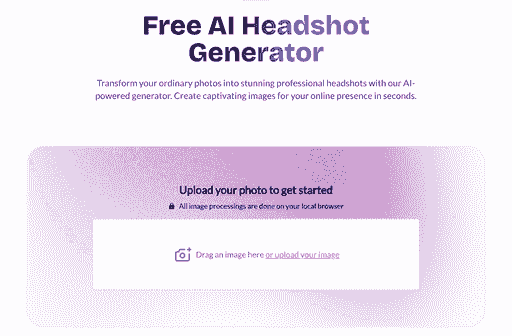
This article is part of our LinkedIn Headshots collection.
BetterPic offers a free AI LinkedIn photo generator that creates up to 10 professional headshots in 4K resolution — with multiple outfits, backgrounds, and a full commercial license. No credit card is required. You upload a few selfies, choose your styles, and the AI generates polished, LinkedIn-ready portraits.
The trade-off for the free plan is queue time (currently 1–3 months). If you need results faster, paid plans deliver the same 4K quality in 1–2 hours starting at $35.
How Does the Free AI LinkedIn Photo Generator Work?
BetterPic's free tool uses machine learning to transform casual selfies into studio-quality headshots. Here is the process:
- Visit the Free AI Headshot Generator
- Upload 8–20 recent photos of yourself — clear, well-lit, from different angles
- Select your preferences — choose from professional styles, outfits, and backgrounds
- Join the free queue — the AI trains a model of your face and generates your headshots
- Download your headshots — you will receive an email when your 4K portraits are ready
The AI analyzes your facial features, skin tone, hair, and proportions from your uploaded photos, then renders new professional images that look like you — not a generic placeholder.
What Do You Get with the Free Plan?
| Feature | Free Plan | Paid Plans (from $35) |
|---|---|---|
| Number of headshots | Up to 10 | 20–120 |
| Resolution | 4K | 4K |
| Outfits and backgrounds | Up to 5 | 150+ |
| AI editing credits | 5 | 2–8+ |
| Human editing | — | On Expert plan |
| Commercial license | Yes | Yes |
| Watermark | None | None |
| Delivery time | 1–3 months (queue) | 1–2 hours |
| Credit card required | No | Yes |
Why Your LinkedIn Photo Matters
Your LinkedIn profile photo is often the first impression you make on recruiters, clients, and collaborators. The impact is measurable:
- Profiles with a professional headshot receive up to 14x more views and up to 40% more connection requests than those without a photo
- Recruiters evaluate your photo before reading your headline or experience
- A polished headshot signals professionalism — attention to detail, workplace readiness, and credibility
For most professionals, a LinkedIn headshot is no longer optional — it is expected. But traditional photography costs $200–$400 per session and requires scheduling and travel. AI headshot generators make the same quality accessible for a fraction of the cost, or free. Many professionals also use a reputation management platform to strengthen their overall online presence and maintain a consistent professional image across platforms.
For complete guidance on LinkedIn headshot best practices, see Professional LinkedIn Headshots — Complete Guide.
What Makes BetterPic Different from Other Free AI Photo Tools?
Most free AI headshot tools produce a single low-resolution image with a watermark and personal-use-only rights. BetterPic's free plan is different:
- 4K resolution — sharp enough for LinkedIn, resumes, websites, and even print
- Multiple styles — 5 outfit and background options, not just one generic look
- No watermark — the images are yours to use immediately
- Commercial license — use on LinkedIn, your resume, company website, or business cards
- AI editing credits — make basic adjustments to your results
The trade-off is speed: because BetterPic runs the same high-quality 4K model for free users, requests are placed in a shared queue. The current wait is approximately 1–3 months. Once your turn arrives, generation is fast and you receive an email notification.
If you cannot wait, you can upgrade after joining the free queue and receive your headshots in 1–2 hours.
For a broader comparison of free vs paid AI headshot tools, see Is There a Free AI Headshot Generator That Actually Works?
How to Get the Best Results from the Free Generator
- Upload quality photos — 10–20 clear selfies with good lighting, different angles, no sunglasses or heavy filters
- Include variety — mix of expressions, angles, and outfits helps the AI learn your features
- Choose professional styles — for LinkedIn, stick to business and corporate presets
- Review all results — zoom in to check eyes, teeth, and hair for artifacts before publishing
- Use the AI editing credits — adjust background, crop, or brightness as needed
For detailed prompt-writing guidance that helps any AI headshot tool produce better results, see AI Prompt for Professional Headshot — Templates, Tips, and Tools.
Who Should Use the Free AI LinkedIn Photo Generator?
BetterPic's free plan is a strong fit for:
- Job seekers who need a professional headshot but are between opportunities and budget-conscious
- Students and recent graduates creating their first LinkedIn profile
- Freelancers building their online presence from scratch
- Small business owners who want consistent team headshots without the cost of a photographer
- Anyone testing AI headshots before committing to a paid plan
If you need results urgently (within hours, not months), the paid plans starting at $35 deliver the same 4K quality with 1–2 hour turnaround, 150+ styles, and additional editing options. See BetterPic pricing for details.
What About LinkedIn Photo Size and Format?
LinkedIn requires a square (1:1) profile photo displayed as a circle:
- Minimum size: 400 × 400 pixels
- Recommended: 800 × 800 to 1200 × 1200 pixels
- Max file size: 8 MB
- Format: JPG or PNG
BetterPic's 4K headshots exceed all of these requirements, so you can crop and resize for LinkedIn without losing quality. For a complete guide to headshot dimensions across all platforms, see Headshot Size: Standard Dimensions, Aspect Ratios & Pixels.
Free AI LinkedIn Photo Generators Compared
Several tools offer some form of free AI headshot generation. The table below compares what each actually provides on its free tier so you can make an informed choice before uploading your photos.
| Tool | Free Photos | Resolution | Watermark | Commercial License | Wait Time |
|---|---|---|---|---|---|
| BetterPic | Up to 10 | 4K | No | Yes | 1–3 months (queue) |
| Canva AI Headshots | 1–2 (limited credits) | Up to 1080p | No | Restricted (Canva license) | Minutes |
| HeadshotPro free trial | 1–4 | Up to 1080p | No | No (personal use only) | Minutes |
| Fotor AI Headshot | 1–3 (daily credits) | Up to 1080p | Yes (on free tier) | No | Minutes |
| LinkedIn AI Photo (native) | 1 | Profile-display only | No | N/A | Minutes |
Key takeaways from the comparison:
- BetterPic is the only free tool that delivers genuine 4K output with a commercial license and no watermark — the trade-off is the queue wait
- Most competitors offer faster turnaround but impose watermarks, lower resolution, or personal-use-only restrictions on their free tiers
- If you need headshots for a company website, business cards, or press kit, check the commercial license terms of any tool you use
For a deeper analysis of how each tool compares on output quality and realism, see I Tested 6 AI Headshot Generators — These Are the Most Realistic.
Common Mistakes When Using Free AI Headshot Generators
Even the best AI model will produce poor results if you feed it bad inputs or misuse the output. These are the six most common mistakes people make with free AI headshot tools.
1. Uploading low-quality selfies
Blurry, dark, or heavily compressed photos give the AI insufficient detail to reconstruct your face accurately. Use photos taken in natural daylight or well-lit indoor settings, at full resolution from your phone's native camera app — not screenshots or images that have been cropped and re-shared.
2. Using heavily filtered photos
Snapchat-style filters, beauty modes, and heavy skin-smoothing alter your facial geometry and skin tone. The AI trains on what it sees, so if your uploads show an artificially smoothed or reshaped version of your face, the output will look inconsistent with how you actually appear.
3. Choosing only one angle
Uploading 15 photos where your face is always at the same angle teaches the AI a flat representation of your features. Include a mix of straight-on, slight left, and slight right angles so the model builds a three-dimensional understanding of your face. This produces more natural-looking results across the generated styles.
4. Picking unprofessional style presets
For LinkedIn specifically, casual, creative, or fantasy style presets are rarely appropriate. Stick to the business, corporate, or executive presets. If you are unsure, run a quick comparison: show the output to a colleague and ask whether they would trust the person in the photo as a professional contact.
5. Not reviewing results at full resolution
AI headshots can look polished at thumbnail size but contain visible artifacts — misaligned teeth, soft eyes, or unnatural hair edges — when viewed at full size. Before downloading and publishing any headshot, zoom into the face at 100% to check the detail. Use your AI editing credits to adjust or regenerate images that do not hold up at full resolution.
6. Using the same photo across all platforms without cropping
LinkedIn, a resume, a company website, and a speaking bio all have different aspect ratio requirements. A square crop that works on LinkedIn may cut off your shoulders on a website that displays rectangular headshots. Download the full-resolution file from BetterPic and create platform-specific crops rather than uploading the same file everywhere.
Frequently Asked Questions
Is BetterPic's free AI headshot generator really free?
Yes. The free plan requires no credit card and no subscription. You upload your photos, join the generation queue, and receive up to 10 4K headshots with a commercial license at no cost. The only requirement is patience — the current queue wait is approximately 1–3 months due to high demand.
How long does the free queue take?
The current wait time for BetterPic's free plan is approximately 1–3 months. Queue position depends on submission volume. You receive an email notification when your headshots are ready. If you cannot wait, you can upgrade to a paid plan at any time and receive results in 1–2 hours.
Can I use free AI headshots on my resume?
Yes. BetterPic's free plan includes a commercial license, so you can use your headshots on a resume, LinkedIn profile, company website, business cards, or any other professional context. Most other free AI headshot tools restrict output to personal use — always check the license terms before publishing.
Do free AI headshots have watermarks?
BetterPic's free headshots do not include watermarks. Some competing free tools do add watermarks or require a paid upgrade to download a clean file. BetterPic's free tier delivers the same watermark-free output as its paid plans — the only difference is delivery time and the number of available styles.
What is the quality difference between free and paid AI headshots?
Both plans use the same 4K generation model, so the core output quality is identical. The differences are quantity (up to 10 on the free plan versus 20–120 on paid), style variety (up to 5 versus 150+), delivery speed (1–3 months versus 1–2 hours), and access to human editing on the Expert plan. See BetterPic pricing for the full breakdown.
Can I upgrade from the free plan later?
Yes. If you join the free queue and later decide you need your headshots sooner, you can upgrade to a paid plan and move to priority processing. Your uploaded photos carry over, so you do not need to re-submit. Paid plans start at $35 and deliver results in 1–2 hours with access to 150+ styles.
Get Started
Ready to upgrade your LinkedIn presence? Create your free AI-generated headshots today:
Get your free AI LinkedIn headshots
Or explore the paid options for faster delivery:
Explore BetterPic's 4K AI headshot packages
For a hands-on comparison of AI headshot quality across 6 popular tools, see I Tested 6 AI Headshot Generators — These Are the Most Realistic.
Sources & References
- LinkedIn Profile Photo Tips — LinkedIn
- How Your Profile Photo Impacts Your LinkedIn Presence — LinkedIn Official Blog
- AI Image Generation Market Report — Grand View Research
- How AI Is Changing Photography — Forbes
- Professional Headshot Photography Pricing — Thumbtack
Written by
Apoorv SharmaHead of Performance
Apoorv leads performance and growth at BetterPic with 9+ years of experience across SEO, SEM, and growth marketing. He oversees content strategy, data-driven marketing, and hands-on testing of AI headshot platforms. Previously held senior performance marketing roles across the US, Belgium, and India.
- Google Analytics & Google Ads certified
- HubSpot Inbound & Content Marketing certified
- 9+ years in SaaS growth and performance marketing
Related linkedin headshots resources
Keep exploring this topic with focused resources from the B2C journey.
Primary destination:LinkedIn headshots
Frequently Asked Questions
Is BetterPic's LinkedIn photo generator really free?
- Yes. BetterPic offers a genuinely free AI LinkedIn photo generator that creates up to 10 headshots in 4K resolution with multiple outfits and backgrounds, a commercial license, and no watermarks. No credit card is required. The trade-off is queue time — free users currently wait approximately 1–3 months. Paid plans start at $35 and deliver results in 1–2 hours.
How does the free AI LinkedIn photo generator work?
- Upload 8–20 clear selfies from different angles, select your preferred professional styles and backgrounds, and join the free queue. BetterPic's AI trains a temporary model based on your facial features, then generates realistic professional headshots. You receive an email when your 4K portraits are ready to download.
What size should a LinkedIn profile photo be?
- LinkedIn uses a square (1:1) profile photo displayed as a circle. The minimum recommended size is 400 × 400 pixels, but 800 × 800 to 1200 × 1200 pixels gives a sharper result on modern devices. The maximum file size is 8 MB. Use JPG or PNG format. BetterPic's 4K headshots exceed all LinkedIn requirements.
Can I use the free AI headshots for professional purposes?
- Yes. BetterPic's free plan includes a full commercial license, so you can use the generated headshots on LinkedIn, resumes, company websites, business cards, and other professional materials without restrictions or additional licensing steps.
How long does it take to get free AI LinkedIn headshots?
- BetterPic's free queue currently has a wait time of approximately 1–3 months, depending on demand. Once your turn arrives, generation is fast and you receive an email notification. If you need results sooner, you can upgrade to a paid plan (starting at $35) after joining the free queue and receive your headshots in 1–2 hours.
Save 87%on average on your professional photos.
Whenever, wherever you are.
Get studio-quality, 4K images in a variety of outfits & settings in less than an hour.
Get your headshots nowStart now
